1Discover Keywords
Discover high-opportunity Pinterest keywords.
Research winning keywords, turn them into beautiful pins, review your drafts, and publish — all in one place. Free for signed-up users, supported by ads.
128 keyword ideasfor “home decor ideas” · United States
| Keyword | Volume | Opportunity |
|---|---|---|
| home decor ideas | 50K–100K | 78 |
| small apartment decor ideas | 10K–50K | 86 |
| boho home decor | 10K–50K | 81 |
| cheap home decor ideas | 10K–50K | 88 |
Volumes labelled by source — Pinterest Ads ranges where Pinterest publishes them, modelled estimates everywhere else.

Find high-opportunity Pinterest keywords.
Turn keywords into beautiful, SEO-friendly pins.
Check and refine your drafts before publishing.
Post now or schedule to your Pinterest account.
Track performance and find your next opportunities.
Track competitors and find new growth opportunities.
Analyze Competitors →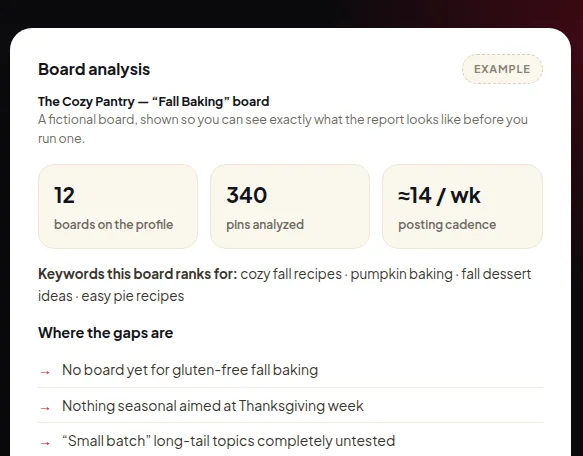
Create stunning, eye-catching Pinterest pins with AI.
Start Creating →


Get detailed insights and improve your pins.
Analyze Your Pin →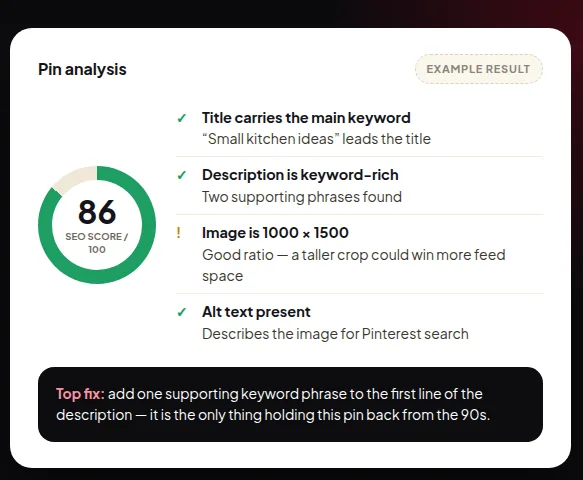
Smarter tools. Bigger reach. Real results.
How it works
In four simple steps
Discover high-opportunity Pinterest keywords.
Explore trends and competitors.
Turn a keyword — or your own page — into a finished pin.
Add SEO details and download.
Turn your topic into a Pinterest pin image with a clear text overlay and your website name. Choose a visual direction, review the matching title and description, then download your image and copy the details.



From keyword discovery to AI-generated pin assets, see exactly how PinInspect works before you sign up. — this is the real product, filmed end to end.
PinInspect labels every keyword by search intent so you create the right pin for the right moment — not just any pin.
Users are collecting ideas for later. Best for listicles, tutorials, and product round-ups. High save rate = fast distribution by the Pinterest algorithm.
Users are browsing for aesthetic ideas. Best for mood boards, room makeovers, outfit ideas, and lifestyle imagery. Visual quality matters most here.
Users are actively planning a purchase, event, or project. High commercial value. Best for product comparisons, guides, checklists, and how-to content.
Users are exploring a way of living or identity. Best for wellness, travel, fitness, and personal style content. Strong for brand awareness and follower growth.
PinInspect combines keyword discovery, trend signals, competitor gaps, board context, and AI pin generation in a single workspace.
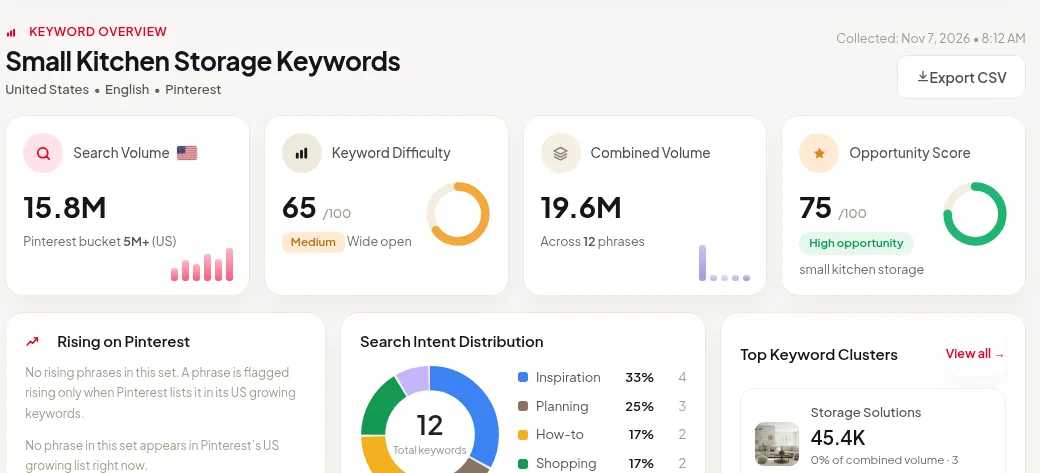
Open the Pinterest keyword research tool to cluster long-tail keywords by intent, competition, freshness, trend direction, and board fit.
Use the AI Pinterest title generator, description generator, hashtag generator, board copy, and image prompt generator from one keyword.
Turn competitor profiles into content angle gaps with the Pinterest competitor analysis tool.
Review title quality, description strength, keyword relevance, CTA clarity, and visual signals with the Pinterest profile analyzer.
Find Pinterest keywords that drive blog traffic. Research what readers are searching for, then create pins that rank — before you write a single word.
Discover high-intent Pinterest keywords buyers use when planning purchases. Optimize product pins with titles, descriptions, and hashtags that convert saves into clicks.
Find low-competition Pinterest keywords in profitable niches. Generate pin content for multiple products in minutes with selectable styles in the Pin Generator.
Stop guessing what to post. Use trend signals and opportunity scores to plan a content calendar that aligns with what Pinterest users are searching for right now.
Run competitor audits, keyword research, and pin generation for multiple clients in one workspace. Export CSV reports to share research without extra tools.
Get the keyword research and SEO tools that big brands rely on — free for everyday research, with every tool included.
Here is how the features compare.
| Feature | PinInspect | Other tools | Pinterest Trends |
|---|---|---|---|
| Pinterest keyword research | ✓ Included | ✓ Included | Limited |
| Opportunity scores | ✓ Included | ✓ Included | ✗ None |
| Search intent labels | ✓ Included | Varies | ✗ None |
| Competitor analysis | ✓ Included | ✓ Included | ✗ None |
| AI pin title generator | ✓ Included | Some tools | ✗ None |
| Pin analyzer with scores | ✓ Included | Rare | ✗ None |
High-intent, searchable, save-worthy pin title variations with the primary keyword close to the front.
Luxury Modern, Minimal Aesthetic, Viral Bold, Feminine Lifestyle, and Professional Business prompts.
SEO score, CTR score, engagement prediction, keyword density, CTAs, hooks, and improvement checklist.
Sample pins generated with PinInspect — AI photo, typeset headline · your image follows your topic
Watch Demo — keyword research to finished pin, in 70 secondsPinInspect covers the four jobs of Pinterest growth in one workspace: keyword research, pin generation, pin automation (scheduling inside your publish window; direct Pinterest publishing is live — publish and schedule straight to your boards), and optimization — every pin is scored for Pinterest SEO before it goes out.
Yes — PinInspect is free for signed-up users and stays free, with no card and no trial clock. You get the research tools, full Designer previews, the SEO score on every pin and full-quality downloads. Everything is included, supported by ads.
Paste a page URL and the Designer reads its photos and details — including recipe and product data when the page provides it — then designs finished 1000 × 1500 pins and scores each one. You can also start from a keyword or topic instead.
No. You can research, create, score and download pins without connecting anything. Connecting Pinterest links your boards to your workspace. Direct publishing from PinInspect is live — connect your account and pins publish or schedule straight to your boards; you can still download pins or export a Pinterest-ready CSV any time.
Yes. With a free account — just Google sign-in, no card needed — you get the keyword lab, pin analyzer, competitor radar, and AI pin studio. Everything is free for signed-up users, supported by ads.
Pinterest Trends only shows a small set of trending searches with no competition data, no opportunity scores, and no way to generate pin content. PinInspect gives you hundreds of keyword variations per search, opportunity scores, intent labels, competitor gap analysis, and AI pin generation — all in one place.
Yes. Pinterest ranking depends on title keyword relevance, description quality, hashtag accuracy, board fit, and save rate. PinInspect improves all of these: keyword research finds the right terms, the pin analyzer identifies weaknesses in existing pins, and the AI generator creates optimized titles and descriptions that match how Pinterest users actually search.
Yes. The Pin Generator generates a full hashtag set alongside your pin title, description, alt text, CTA hooks, board name ideas, and image prompts — all from one keyword input. Review suggested hashtags for relevance before publishing.
No. Keyword research, competitor analysis, and AI pin generation all work without connecting a Pinterest account. Some advanced features — like analyzing your own pins and boards — use your Pinterest token for deeper data, but that connection is optional.
Yes. PinInspect is used by ecommerce sellers, affiliate marketers, bloggers, Pinterest VAs, content creators, agencies, and small businesses. The keyword research workflow and AI pin generator work for any niche — fashion, home decor, food, travel, health, finance, and more.
No payment details. No trial limits. Your full workspace is ready in 30 seconds after Google sign-in.
Separate tools, clean workflows, and clear outputs users can act on.
A-Z suggestions, AI expansion, volume estimates, intent, difficulty, clusters, and export.
Use Pinterest trend endpoints where available, then enrich seasonal angles with OpenAI.
Analyze pin URL, title, description, image, board, performance score, and AI optimization ideas.
Audit board metadata, top pins, pin count, follower signals, and keyword insights.
Track profile stats, boards, content gaps, and competitor opportunities.
SEO titles, descriptions, hashtags, alt text, board suggestions, prompts, and CTAs.
Create multiple searchable pin title angles for saves, clicks, and topical relevance.
Create vertical 1000x1500 prompt packs for Pinterest-style visuals.
Generate board names, descriptions, and topical grouping ideas for Pinterest SEO.
Long-tail Pinterest keywords with opportunity scores, intent labels and trend direction — plus Room to Rank and the best publish window for seasonal terms.
The Designer turns a page URL or a keyword into finished 1000 × 1500 pins — six designs, separately typeset headlines, and an SEO score on every pin.
Queue pins inside your publish window at your spacing. Connect Pinterest once and approved pins publish on schedule — or export a Pinterest-ready CSV.
Pin and board analyzers, competitor gaps, and a destination checker — so a great pin never sends clicks to a slow or broken page.
Also in the suite: the Keyword Research Tool, the Board Analyzer, the Hashtag Generator and the Trends Tool.
Turn your topic into a Pinterest pin image with a clear text overlay and your website name. Choose a visual direction, review the matching title and description, then download your image and copy the details.
From keyword discovery to AI-generated pin assets, see exactly how PinInspect works before you sign up — the real product, shown screen by screen.
These four run instantly in your browser. No sign-in, no credits, nothing uploaded.
PinInspect labels every keyword by search intent so you create the right pin for the right moment — not just any pin.
Users are collecting ideas for later. Best for listicles, tutorials, and product round-ups. High save rate = fast distribution by the Pinterest algorithm.
Users are browsing for aesthetic ideas. Best for mood boards, room makeovers, outfit ideas, and lifestyle imagery. Visual quality matters most here.
Users are actively planning a purchase, event, or project. High commercial value. Best for product comparisons, guides, checklists, and how-to content.
Users are exploring a way of living or identity. Best for wellness, travel, fitness, and personal style content. Strong for brand awareness and follower growth.
PinInspect combines keyword discovery, trend signals, competitor gaps, board context, and AI pin generation in a single workspace.
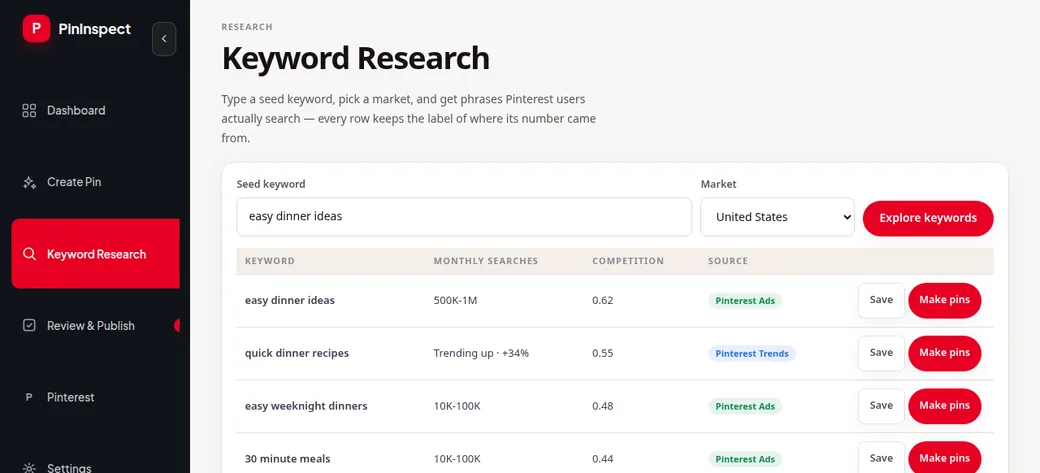
Open the Pinterest keyword research tool to cluster long-tail keywords by intent, competition, freshness, trend direction, and board fit.
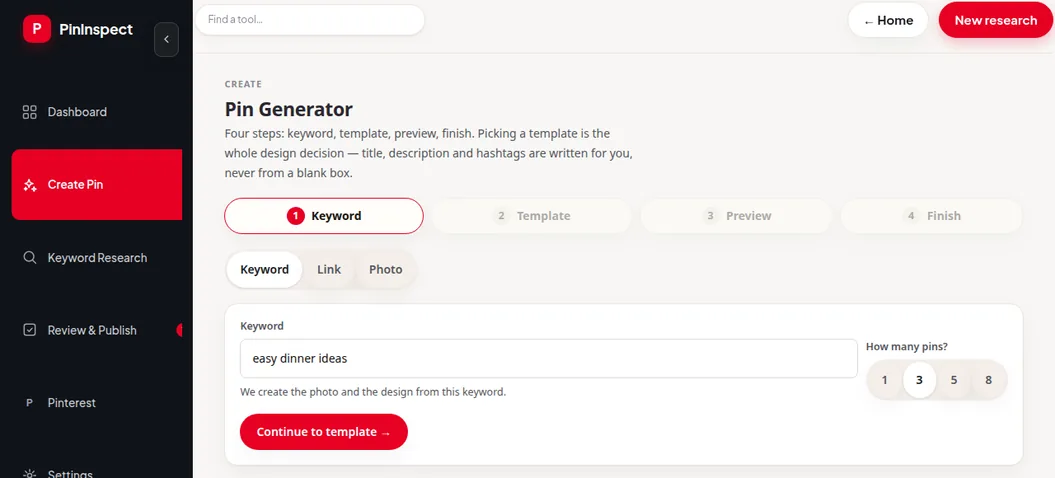
Use the AI Pinterest title generator, description generator, hashtag generator, board copy, and image prompt generator from one keyword.
Turn competitor profiles into content angle gaps with the Pinterest competitor analysis tool.
Review title quality, description strength, keyword relevance, CTA clarity, and visual signals with the Pinterest pin analyzer.
Find Pinterest keywords that drive blog traffic. Research what readers are searching for, then create pins that rank — before you write a single word.
Discover high-intent Pinterest keywords buyers use when planning purchases. Optimize product pins with titles, descriptions, and hashtags that convert saves into clicks.
Find low-competition Pinterest keywords in profitable niches. Generate pin content for multiple products in minutes with selectable styles in the Pin Generator.
Stop guessing what to post. Use trend signals and opportunity scores to plan a content calendar that aligns with what Pinterest users are searching for right now.
Run competitor audits, keyword research, and pin generation for multiple clients in one workspace. Export CSV reports to share research without extra tools.
Get keyword research and SEO tools built specifically for Pinterest — free for everyone, with no card required to begin.
Most Pinterest SEO tools charge a monthly fee for comparable research features.
| Feature | PinInspect | Other tools | Pinterest Trends |
|---|---|---|---|
| Pinterest keyword research | ✓ Free | ✓ Costs money | Limited |
| Opportunity scores | ✓ Included | ✓ Costs money | ✗ None |
| Search intent labels | ✓ Included | Varies | ✗ None |
| Competitor analysis | ✓ Free | ✓ Costs money | ✗ None |
| AI pin title generator | ✓ Free | Some (costs money) | ✗ None |
| Pin analyzer with scores | ✓ Free | Rare (costs money) | ✗ None |
| Monthly cost | $0 — free | — | Free (limited) |
Looking at the similarly named desktop app instead? See how PinInspect compares as a Pin Inspector alternative — free and in your browser, nothing to install.
Unlike generic keyword tools built for Google, PinInspect is designed specifically for how Pinterest search works. Every keyword comes with a Pinterest-specific opportunity score, search intent label, trend direction indicator, and suggested board categories — so you're making decisions based on Pinterest data, not Google data applied poorly. For content teams managing multiple Pinterest accounts, PinInspect functions as a full Pinterest SEO software suite: it turns raw keyword research into pin titles, descriptions, hashtags, alt text, board ideas, and visual image prompts without exposing API keys or requiring a Pinterest account to get started.
High-intent, searchable, save-worthy pin title variations with the primary keyword close to the front.
Luxury Modern, Minimal Aesthetic, Viral Bold, Feminine Lifestyle, and Professional Business prompts.
An SEO checklist score, keyword density, CTAs, hooks, and an improvement checklist.
I built PinInspect because I kept watching good pages fail on Pinterest for a boring reason: making one proper pin by hand takes forever, so most pages never get one at all.
The Designer takes a page you have already published and turns it into finished, scored pins — then schedules them inside your publish window. No blank canvas, no design grind: the work you already did keeps working for you.
How we work: our methodology, editorial policy and refund policy.
Pinterest does not publish official keyword search volumes, and there is no public Pinterest volume API. Every volume figure on PinInspect is an estimate — labelled “est. volume” wherever it appears.
For a seed keyword, an AI model drafts a rich set of keyword ideas across the topic's angles and clusters. Every idea is then checked against Pinterest: phrases Pinterest Ads measures carry Pinterest's own bucketed volume range for the selected market, and phrases on Pinterest's growing-keywords list are flagged with Pinterest's own growth figures. Volumes without a Pinterest range — and all difficulty and opportunity scores, which Pinterest does not publish — are PinInspect modeled estimates built from cluster breadth and the idea set's structure, and are labeled as estimates everywhere they appear.
Prioritising: which keywords deserve a pin first, which boards to build, and how topics compare against each other. Relative differences between keywords are the useful signal.
They are not measured search counts, not Pinterest-reported data, and not a traffic forecast or guarantee. Treat any single number as directional — the way you would treat any third-party keyword estimate.
These estimates power the Keyword Research planner, the Pin Analyzer and the Trends Tool. How we write and review the guides that cite them is set out in our editorial policy.
Useful content pages that make the product trustworthy and help users understand the workflow.
Every PinInspect tool is free for everyone — keyword research, the pin generator, the Designer, scheduling and analytics. No card, no plans, nothing to buy. Ads support the site and pay for the servers and image generation — our Ad Policy explains how they work.
Designed pins — every day. Designed pins (from a link or your photo) are capped at 5 a day for everyone, so generation stays fast and fair. The allowance refills every day.
Everything else — free. Optimizing a pin, analyzing a board, keyword research and scheduling are all free — no credits, no card, no paid tier.
Downloads, plainly: every pin downloads in full quality, and keyword research runs up to 25 times a day.
Ads: A short ad may play before generation. If no ad is available, your pin still generates — free either way.
Everything: the research tools, all 606 templates with full Designer previews, the SEO score on every pin, full-quality downloads and scheduling. There is no paid tier and nothing to unlock.
They don't — there are no credits. Every tool is free for signed-up users; the only limit is a fair-use cap of 5 designed pins a day, refilled daily, and keyword research runs up to 25 times a day. Ads support the site.
Whether you have a product question, found a bug, want to partner, or just want to say hello — we read every email and reply within 24 hours on business days.
Account access, tool errors, keyword research questions, Pinterest SEO help, and feature requests.
[email protected] ↗Agency integrations, affiliate arrangements, co-marketing, tool embedding, and business collaborations.
[email protected] ↗Spotted something broken? Describe the issue, your browser, and steps to reproduce. We fix bugs fast.
[email protected] ↗Direct email
[email protected]We respond within 24 hours on business days. For urgent account issues, mention URGENT in the subject line.
Email [email protected] for product support, account help, bug reports, and Pinterest SEO questions. We respond within 24 hours on business days.
Yes. PinInspect works with bloggers, agencies, Pinterest VAs, ecommerce sellers, and affiliate marketers. Email [email protected] with your proposal.
PinInspect is free — daily keyword research, pin analysis, board analysis, and AI pin detail generation. Sign in with Google to get started at no cost.
Free Pinterest keyword research, pin analysis, board insights, and AI pin detail generation.
Start free with GoogleLast updated: June 1, 2026 · Effective: June 1, 2026
Summary: PinInspect collects only what is needed to run the service. We do not sell your data. You can delete your account at any time from Profile → Danger zone in the app, or by emailing [email protected].
PinInspect is a Pinterest SEO tool platform operated by Hamza Sultan, a software engineer based in Multan, Punjab, Pakistan. Contact: [email protected].
When you sign in with Google, we receive your name, email address, and profile picture via Google OAuth. We also collect keyword research queries, saved keywords, pin and board analysis requests, AI-generated outputs, tool usage counts, session data (server-side cookies), and anonymous analytics via Google Analytics.
Your data is used only to operate and improve PinInspect — authenticating your account, enforcing daily tool limits, storing saved keywords, delivering email verification, diagnosing errors, and understanding which features are most useful. We do not sell, rent, or share your personal data with advertising networks or data brokers.
PinInspect uses a server-side session cookie (HTTP-only, secure, 24-hour expiry) to keep you signed in. We use Google Analytics for anonymous, aggregated usage data. You can opt out via the Google Analytics Opt-out Add-on.
PinInspect uses the Anthropic AI API, Pinterest Public API, and Google OAuth. All backend API credentials are stored as server environment variables and are never accessible to users. Your personal API keys are never stored or exposed.
We retain your account data for as long as your account is active. You can delete your account yourself at any time: open Profile → Danger zone in the app and confirm with the code we email you. Deletion is immediate — your workspace, pins and their image files, boards, schedules, saved items, templates are removed, and you are signed out everywhere. If you prefer, email [email protected] and we will delete your account within 7 business days.
You have the right to access, correct, or delete your personal data at any time. EEA users also have GDPR rights including data portability and the right to lodge a complaint with a supervisory authority. Email [email protected] to exercise these rights.
PinInspect is not directed at children under 13. We do not knowingly collect data from children. If you believe a child has provided us personal data, contact us immediately.
We may update this policy when our data practices change. We will update the date at the top and notify signed-in users by email for material changes.
Questions? Email [email protected] — we respond within 5 business days.
We also run our own analytics system on our own servers to understand how many people visit PinInspect, which tools they use, and where visitors stop before signing up. It sets two cookies: pi_vid (remembers your browser for up to a year) and pi_sid (groups the pages of one visit, 30 minutes). We record pages viewed, buttons clicked, and — if you create an account — steps you complete, such as signing up or creating a pin, linked to your account so we can see the whole journey. We do not store your raw IP address in this system, we do not share this data with third parties, and we never sell it. If your browser sends a Do Not Track signal, this system does not track you.
Related pages
Our legal and trust pages, plus contact information.
PinInspect is an independent tool and is not affiliated with Pinterest, Inc.
Last updated: June 1, 2026 · Effective: June 1, 2026
Summary: Use PinInspect for legitimate Pinterest SEO work. Respect rate limits, do not abuse the platform, and contact us at [email protected] with any questions.
By creating an account or using PinInspect (the “Service”), you agree to these Terms of Service. If you do not agree, do not use the Service. These terms apply to all users, including visitors and signed-up users.
PinInspect provides Pinterest SEO tools including keyword research, pin analysis, board analysis, competitor insights, trend discovery, and AI-assisted pin detail generation. The Service is operated by Hamza Sultan, Multan, Punjab, Pakistan.
You may sign in using Google OAuth. You are responsible for all activity under your account and must not share account access or create accounts on behalf of third parties without permission.
You must not abuse rate limits, access admin systems, scrape proprietary data at scale, reverse-engineer the platform, use PinInspect for spam or inauthentic behavior, or violate Pinterest’s own Terms of Service.
PinInspect is free for every signed-up user, supported by ads. Fair daily limits apply to everyone — 5 designed pins a day and 25 keyword research runs a day — and limits may change as the platform grows.
You retain ownership of content you create using PinInspect. You grant PinInspect a limited, non-exclusive license to store and process your inputs and outputs solely to deliver the Service. We do not claim ownership of your keywords, pin titles, or descriptions.
The PinInspect platform, design, algorithms, scoring models, and brand assets are the intellectual property of PinInspect and its operator. You may not copy, reproduce, or distribute them without written permission.
PinInspect aims for 24/7 availability but does not guarantee uninterrupted service. The platform may be offline for maintenance or reasons outside our control. We are not liable for losses caused by downtime.
PinInspect is provided “as is” without warranty. To the maximum extent permitted by law, PinInspect and its operator are not liable for indirect, incidental, or consequential damages from your use of the Service.
We reserve the right to suspend or terminate accounts that violate these terms without prior notice. You may delete your account at any time by emailing [email protected].
We may update these terms to reflect changes in the Service or law. We will notify signed-in users by email for material changes. Continued use after posting constitutes acceptance.
These terms are governed by the laws of Pakistan. Disputes shall be resolved in the courts of Multan, Punjab, Pakistan.
Questions? Email [email protected] — we respond within 5 business days.
Related pages
Our legal and trust pages, plus contact information.
PinInspect is an independent tool and is not affiliated with Pinterest, Inc.
Last updated: 31 October 2026 · Operated by Hamza Sultan (sole proprietor, trading as PinInspect), Multan, Pakistan.
This policy sits alongside our Terms of Service and Privacy Policy PinInspect is free for signed-up users — there is nothing to purchase, so no refunds apply.
There is no subscription to cancel. You can delete your account at any time from Profile → Danger zone in the app, and everything is removed immediately.
PinInspect takes no payments and holds no card details, so there is never a charge to refund. If you ever believe you were charged in error in connection with PinInspect, email us and we will put it right in full.
PinInspect has no payment processor and no merchant of record, because nothing is sold. Any amount ever taken in error would be returned to the original payment method.
Email [email protected] from the email address on your account and mention the charge. We reply within one business day.
Our editorial policy explains how PinInspect content is written and checked, the methodology page explains how our estimates are built, and the features page lists every tool PinInspect offers.
PinInspect was created by Hamza Sultan, a software engineer and web developer from Multan, Pakistan, to make Pinterest SEO practical, fast, and accessible for every creator and business worldwide.
Founder & Software Engineer
Based in Multan, Punjab, Pakistan. Software engineer and full-stack web developer with a focus on building practical SaaS tools that solve real problems. PinInspect was built from scratch — from database design and backend APIs to the frontend interface you see today.
The idea started simply: existing Pinterest SEO tools were either too expensive, too complicated, or not built for how Pinterest actually works. So I built one that is free to start, fast, and focused entirely on Pinterest — not a generic SEO tool with a Pinterest tab added later.
Pinterest is visual, save-driven, and future-focused. Generic keyword tools built for Google miss the intent signals that matter on Pinterest. PinInspect is built specifically for how Pinterest search works.
PinInspect uses Pinterest signals, public trend data, and AI-assisted analysis to give you keyword volume estimates, difficulty scores, trend directions, and opportunity rankings — not just a list of autocomplete suggestions.
Expensive Pinterest SEO tools price out small creators, bloggers, and independent sellers. PinInspect gives you professional-grade keyword research, pin analysis, and AI pin details for free — sign in with Google and start immediately.
From individual bloggers in Pakistan to ecommerce sellers in the US, UK, and Australia — PinInspect is designed to work for any creator or business that wants to grow Pinterest traffic without needing a big budget or SEO agency.
Enter any seed topic and get keyword ideas with volume estimates, difficulty scores, trend direction, search intent, opportunity scores, suggested boards, and content angles.
Paste a Pinterest pin URL and get a detailed SEO audit: title quality, description strength, keyword relevance, CTA clarity, visual signals, and a prioritized improvement checklist.
Generate SEO titles, descriptions, hashtags, alt text, boards, hook ideas, CTAs, and image prompts for any keyword — everything you need to publish a pin, in one click.
Audit Pinterest boards for SEO health and analyze competitor profiles to find keyword gaps, content angle gaps, and untapped opportunities in your niche.
Free keyword research, pin analysis, and AI pin details — no complicated setup. Just sign in with Google and start.
PinInspect publishes guides to help creators grow on Pinterest. This page explains who writes them, how we check facts, and how we handle corrections — so you can judge how much to trust what you read.
Our guides are written by Marcus Reid, PinInspect, and published under the direction of our founder, Hamza Sultan. Product and tool pages describe the live PinInspect tools exactly as they work today — if a feature is not in the product, we do not claim it.
Topics come from keyword research, reader questions, and changes in how Pinterest search and recommendations work. Seasonal guides — for example, holiday keyword research — are planned ahead of the search demand they serve.
Statistics and trend figures come from Pinterest's own publications — such as Pinterest Predicts and Pinterest Trends — and are attributed to their source in the article. We never publish invented search volumes, keyword difficulty scores, user ratings, or testimonials, and we never present estimates as measured data.
Pinterest changes constantly, so guides are reviewed and updated as the platform evolves; the date on each guide shows when it was last revised. If you spot an error, tell us via the contact page or at [email protected] — confirmed errors are corrected in the article itself.
Our editorial content is never sold. We do not accept payment for placements, reviews, or links in our guides, and no advertiser or partner can influence a recommendation. Where a guide mentions PinInspect's own tools, that is because they are the tools this site exists to provide — and we say so openly.
Who writes the guides on PinInspect?
Our guides are written by Marcus Reid, PinInspect, and published under the direction of founder Hamza Sultan. Product pages describe the live tools as they work today.
Where does the data in your articles come from?
Statistics come from Pinterest's own publications (such as Pinterest Predicts and Pinterest Trends) and are attributed to their source. We never publish invented search volumes, ratings, or testimonials.
How do I report an error in a guide?
Tell us via the contact page or [email protected]. Confirmed errors are corrected in the article and the guide's updated date is refreshed.
Contact us any time via the contact page. For background on the product itself, see the About page.
The methodology page explains how our keyword estimates are built. Our other policies: Privacy Policy, Terms of Service and Refund Policy. What the product does is listed on the features page.
El descargador de videos de Pinterest y de imágenes en una sola caja: pega el enlace de un pin para guardar videos en MP4 HD, fotos en tamaño original y GIF — sin registro y sin instalar ninguna app.
Gratis, sin iniciar sesión para pines individuales. Las descargas pasan por PinInspect para que tu navegador guarde el archivo — PinInspect no almacena nada. Descarga solo tus propios pines o contenido que tengas permiso de usar.
Tu contenido favorito de Pinterest en solo unos clics.

Compatible con todo tipo de contenido de Pinterest: video, foto, GIF y tus propios tableros.
Los miembros que inician sesión pueden conectar su cuenta de Pinterest y usar esta página como descargador de tableros para sus propios tableros: abre un tablero tuyo y cada pin aparecerá con los mismos botones de descarga, obtenidos mediante la API oficial de Pinterest con el permiso de tu propia cuenta. Esta puerta es solo para tableros tuyos: aquí no hay forma de descargar el tablero, el perfil o el feed de otra persona.
Una forma rápida, confiable y segura de descargar contenido de Pinterest, pensada para tu comodidad.
Respuestas a las preguntas más comunes sobre nuestro descargador de Pinterest.
Sí. Descargar un pin es gratis y no necesitas una cuenta de PinInspect. Pega el enlace de un pin, mira la vista previa y pulsa descargar: el archivo pasa por PinInspect para que tu navegador lo guarde en lugar de abrirlo.
Abre el pin en Pinterest y copia su enlace (en la app de Pinterest, toca el menú … del pin y elige Copiar enlace; en la computadora, copia la URL del pin — también sirve un enlace corto pin.it). Pega el enlace en la caja de la parte superior de esta página y pulsa Descargar ahora. Si el pin tiene video, aparecerá un botón Descargar video con la calidad que Pinterest guarda para ese pin, por ejemplo MP4 en 720p.
Usa la misma caja desde el navegador de tu celular: copia el enlace del pin desde la app de Pinterest (el menú …, luego Copiar enlace), pégalo aquí y pulsa Descargar ahora. En Android, el MP4 se guarda en la carpeta de descargas y aparece en tu galería; en iPhone se guarda en Archivos, desde donde puedes moverlo a Fotos. No hay nada que instalar.
Recibes la mejor calidad que el propio Pinterest guarda para ese pin, y el botón la indica con honestidad: normalmente MP4 en HD de 720p o 1080p. Cuando el video original de un pin es 4K, ese archivo 4K es el que se descarga. PinInspect nunca amplía un video de menor calidad para llamarlo HD.
Los videos verticales cortos de Pinterest (los Idea pins, a menudo llamados reels) se descargan igual que cualquier pin de video: copia el enlace del pin, pégalo en la caja de la parte superior de esta página y pulsa Descargar ahora. Si Pinterest guarda el pin como video público, el MP4 se descarga en la mejor calidad disponible para él.
Sí. Pega el enlace del pin con el GIF en la caja de la parte superior de esta página. Pinterest suele guardar los pines animados como videos MP4 cortos, así que la descarga llega como un MP4 que se reproduce en cualquier lugar: el mismo archivo que Pinterest sirve para ese pin.
No, y no lo necesitas. Este descargador funciona por completo en tu navegador, en celular, tablet y computadora, así que no hay ninguna app ni APK que instalar ni permisos que conceder en tu equipo. Desconfía de los APK de descarga de sitios desconocidos: una herramienta de navegador nunca necesita tu contraseña de Pinterest, y esta nunca te la pedirá.
La mejor calidad que Pinterest sirve para ese pin: imágenes en resolución original cuando Pinterest publica un original, y videos en la calidad MP4 que Pinterest guarda, indicada con honestidad en el botón. PinInspect no almacena, no guarda en caché ni conserva los archivos: cada descarga pasa una sola vez por PinInspect, desde el CDN de Pinterest hasta tu equipo, solo para que tu navegador guarde el archivo original en lugar de abrirlo.
Descarga solo tu propio contenido o contenido que tengas permiso de usar. La mayoría de los pines pertenecen a sus creadores, y reutilizar el video o la imagen de otra persona necesita el permiso de ese creador. Todo en Pinterest también está sujeto a los Términos de servicio de Pinterest, que esta herramienta está diseñada para respetar.
Solo tus propios tableros. Inicia sesión, conecta tu cuenta de Pinterest y los pines de tus tableros aparecerán con enlaces de descarga, obtenidos mediante la API oficial de Pinterest. No descargamos los tableros ni los perfiles de otras personas.
Un pin falla cuando es privado, fue eliminado, no es público o Pinterest está limitando las solicitudes en ese momento. Comprueba que el enlace abra el pin en un navegador sin sesión iniciada, espera un minuto si resolviste varios pines seguidos y vuelve a intentarlo.
PinInspect no aloja ni almacena los archivos: cada descarga pasa una sola vez por nuestro servidor, de Pinterest a tu equipo, y no se guarda nada. Si crees que un pin infringe tus derechos, repórtalo a Pinterest mediante su proceso de derechos de autor y escribe a [email protected]: te ayudaremos en todo lo que podamos.
Guarda tus videos e imágenes favoritos de Pinterest con PinInspect: ¡gratis, rápido y fácil!
Pega el enlace de un pin de video — el enlace de descarga que copias desde la app o tu navegador — y el descargador encuentra el MP4 que el propio Pinterest guarda para ese pin, en la mejor calidad que Pinterest sirve para él: el botón indica la calidad con honestidad, por ejemplo 720p o 1080p HD, y cuando el original es 4K, ese archivo 4K es el que recibes. Los pines de video verticales cortos (Idea pins, a menudo llamados reels) se descargan exactamente igual. El archivo viaja desde el CDN de video de Pinterest, pasa una sola vez por PinInspect y llega a tu equipo, solo para que tu navegador guarde el MP4 en lugar de abrirlo; nunca se almacena, se convierte ni se conserva. No hay colas de espera: un enlace de pin entra, una descarga sale.
Para los pines de imagen, este descargador de fotos de Pinterest devuelve la imagen original en tamaño completo que Pinterest guarda para el pin, no la pequeña vista previa del feed. Cuando Pinterest publica un archivo en resolución original, esa es la descarga que recibes; la tarjeta de vista previa te muestra el pin primero para que confirmes que es el correcto antes de guardarlo. Los pines de imagen y de video se manejan con la misma caja de la parte superior de esta página.
Los pines animados también funcionan. Pega el enlace de un pin con GIF y el descargador devuelve el archivo que Pinterest guarda para él: los pines animados suelen servirse como videos MP4 cortos, así que tu descarga de GIF de Pinterest llega como un MP4 que se reproduce en cualquier galería, app de chat o editor. Es la misma caja y el mismo flujo de un solo clic que para videos e imágenes: copiar el enlace, pegar, descargar.
La calidad aquí es la que el propio Pinterest sirve: nunca una suposición y nunca una ampliación falsa. La mayoría de los pines de video se descargan como MP4 en HD de 720p o 1080p; cuando un creador subió un original en 4K y Pinterest lo guarda, ese archivo 4K es el que recibes, y el botón siempre indica la calidad real antes de que guardes. Esa honestidad es la diferencia entre un descargador HD de verdad y una página que solo lo promete. Si un pin solo existe en una resolución menor, el descargador lo dice en lugar de disfrazarlo.
Descarga tus propios pines o contenido que tengas permiso de usar. La mayoría de los videos e imágenes de Pinterest pertenecen a sus creadores, y guardar un archivo no te transfiere ningún derecho sobre él: pide permiso al creador antes de reutilizar su trabajo y respeta los Términos de servicio de Pinterest. Si crees que un pin infringe tus derechos, repórtalo a Pinterest y contáctanos en [email protected].
Guardar un pin es el principio, no el final. Los pines de los que vale la pena aprender son los que se posicionan para las palabras clave que buscan tus compradores. Pega el mismo tema en la herramienta de palabras clave de PinInspect para ver las frases, la intención y los grupos detrás de pines como ese, y luego crea tu propia versión con el Generador de Pines.
Enter a seed topic and get the phrases Pinterest users actually search — grouped into topic clusters, with search intent and a source label on every single number.
Enter a topic above and PinInspect drafts a rich set of keyword ideas with AI, then checks every phrase against Pinterest itself — Pinterest’s own Ads volume ranges where an ad account provides them, and the phrases Pinterest lists as growing in your market.
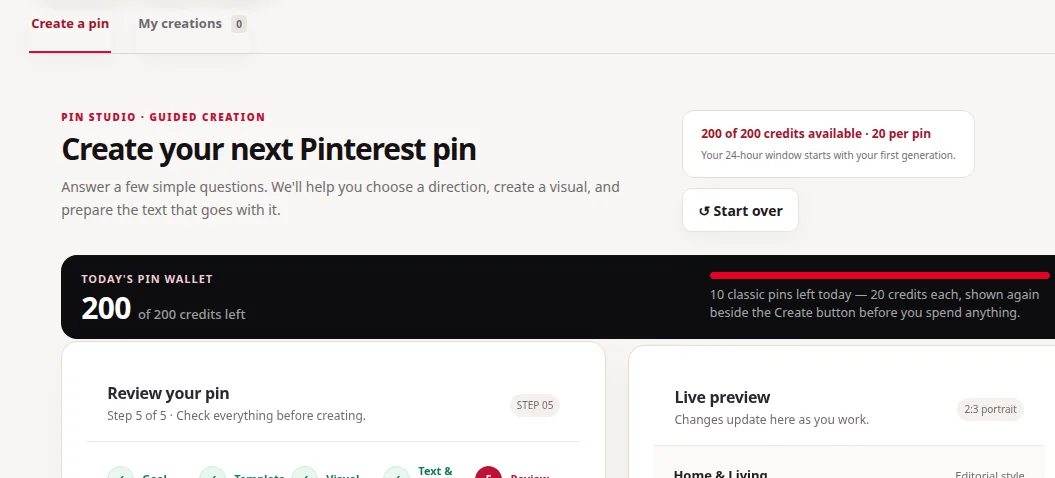
Answer a few simple questions. We'll help you choose a direction, create a visual, and prepare the text that goes with it.
Step 1 of 5 · Tell us what you're creating.
Start with the topic or the result you want people to discover. You don't need to know design terms.
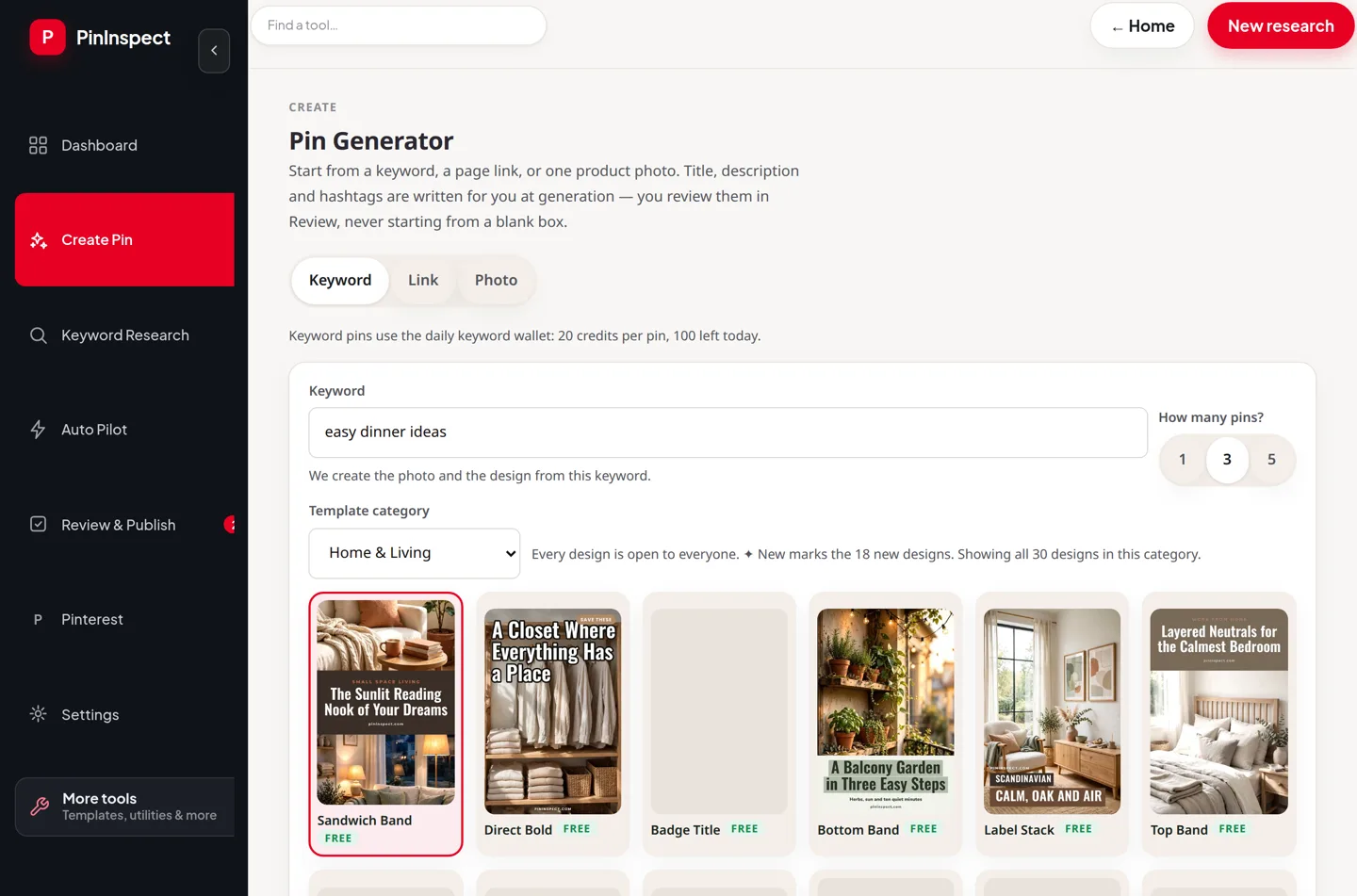
Composed PinInspect designs for your category — real layouts, category palettes and our 48-font library, every one checked for fit and readability. Pick a starting point; you customise everything after.
Loading templates…
Pick the option closest to your idea. You can preview it on the right before you create it.
The headline appears on the image. Supporting text and SEO details help people understand what they'll find after clicking.
Customize every detail. Changes appear instantly on the preview.
Check the image, wording and destination. Creating your pin counts toward your daily cap of 5 designed pins.
Designed pins (from a link or your photo) count toward the same daily cap of 5 — the count is always shown here before anything is created.
Changes update here as you work.
Simple ideas to make every corner count
Illustrative preview · final image quality depends on your selected generation settings.
You can leave this view. The job stays in My creations.
Tell PinInspect what the pin is about and choose a matching category. This helps tailor the creative direction.
Use one clear headline, strong contrast and a visual that supports—not distracts from—the message.
Your pin promise and destination page should match. Check the final image before publishing.
Showing your latest 30 generation jobs.
Upload one product photo, name the product, pick styles. Your photo is used directly in the photo styles; designed styles create fresh artwork from the product name. Finished pins land as drafts in your Review Grid.
Loading styles…
The three pre-picked styles show one of each kind: your photo restyled by AI, a designed pin with the headline in the artwork, and your real photo with a typeset headline.
Turn any public Pinterest asset into actionable SEO signals — pin audits, board health, competitor gaps, and trend data.
Fetch rising Pinterest topics and seasonal keyword opportunities.
Inspect a public pin and get performance data, SEO score, and improvement suggestions.
Analyze board structure, top pins, follower signals, and keyword coverage.
Inspect boards, keyword gaps, and content opportunities from any Pinterest profile.
Your saved opportunities. Select any keyword to create a pin or run further analysis.
| Keyword | Est. volume | Competition | Trend | Collection | Actions |
|---|---|---|---|---|---|
| Sign in and open this page to load your saved keywords. | |||||
Work out your Pinterest engagement rate, save rate and click rate from your own numbers — the same formulas behind the public calculator.
Enter the numbers from your own Pinterest analytics for any period. The standard formulas are applied instantly, right here in your browser.
Your engagement rate, save rate and click rate side by side, so you can see whether people are saving, clicking, or just scrolling past.
Compare like with like — the same period length on the same profile or board. Pinterest publishes no official “good” rate, so your own trend is the benchmark that matters.
Resize any image to the exact Pinterest sizes — 2:3 pin, square, long pin or video cover. It runs in your browser; nothing is uploaded.
Add any image and pick a size. The image is resized and centre-cropped locally to the exact preset — no upload, no waiting.
A ready-to-publish file at the exact Pinterest dimensions: standard pin 1000 × 1500, square, long pin, or video cover.
Start from the largest original you have. Enlarging a small image cannot add detail, and Pinterest favours crisp, vertical pins.
Fresh, keyword-rich board name ideas for any topic, grouped by intent. Click any name to copy it.
Type your topic and get board name ideas grouped by intent — search-led, inspiration, how-to and more — built around the words people actually search.
A shortlist of clear, keyword-led board names you can copy straight into Pinterest.
Name boards the way people search, one clear topic per board. A plain descriptive name beats a clever one every time.
Three ready-to-paste alt text drafts for any pin image — keyword-aware and kept inside Pinterest-friendly lengths.
Describe what is actually visible in your image and get three ready-to-paste alt text drafts, kept inside Pinterest-friendly lengths.
Natural, keyword-aware drafts with one-click copy — a starting point you can adjust in seconds.
Alt text must describe the real image. Edit anything that does not match what is visible, and never stuff in keywords the image does not show.
The free downloader, inside your workspace. Paste a Pinterest link and save the video or image in its original quality.
Free for single pins, on every plan. Downloads stream through PinInspect so your browser saves the file — PinInspect stores nothing.
Pins you resolved here, listed so you can save them again without pasting the link twice.
Nothing here yet — resolve a pin above and it lands in this list.
Only download your own pins, or content you have permission to use.
Activity history, score summaries, and research reports across all your tool runs.
Manage your workspace name, profile image, and account details.
Loading your profile…
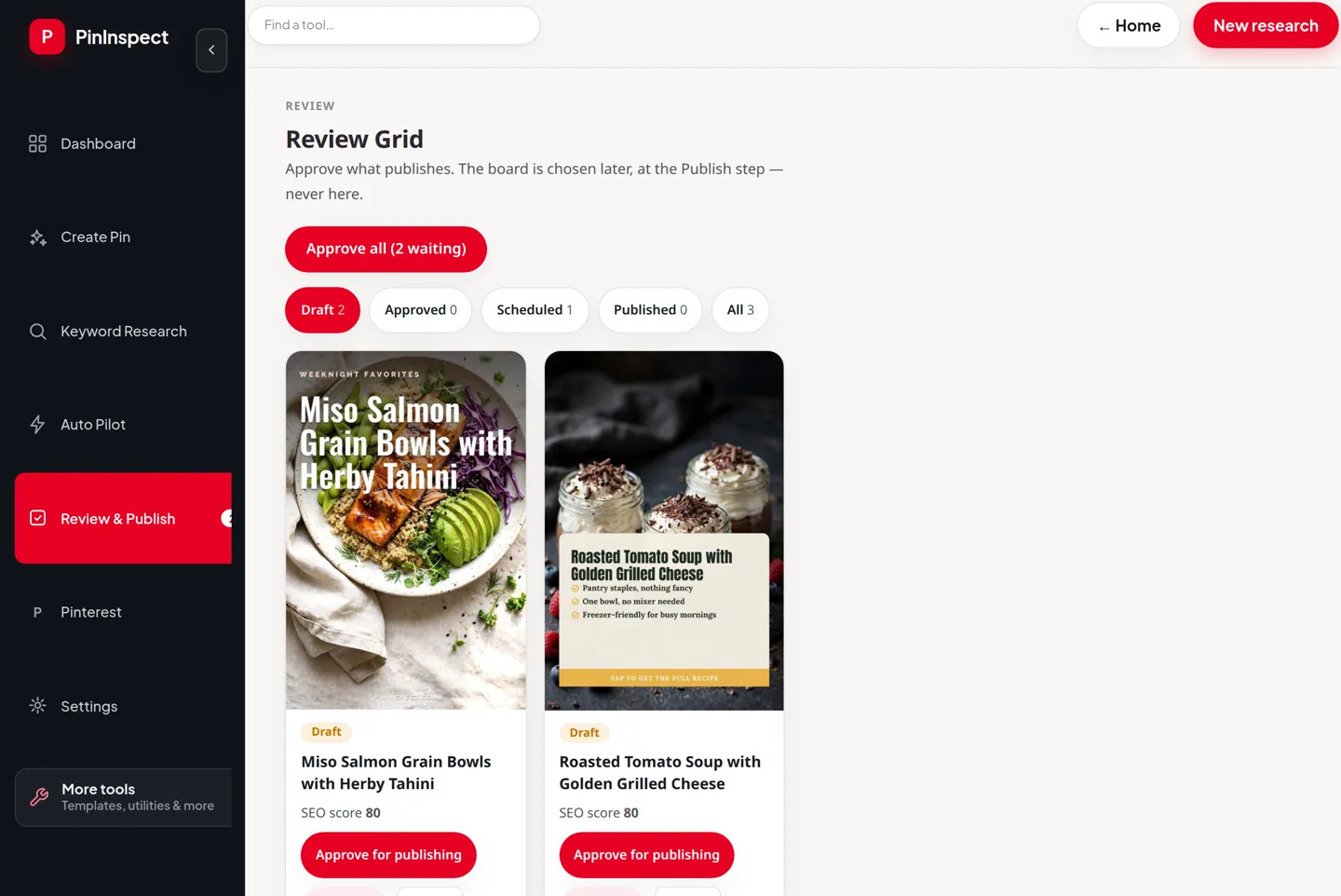
Approve what publishes. Rejected drafts stay editable; approved pins can be scheduled into your publish window.
Fine-tune one pin: template, brand colours, logo and text.
Everything approved and waiting, in publish order.
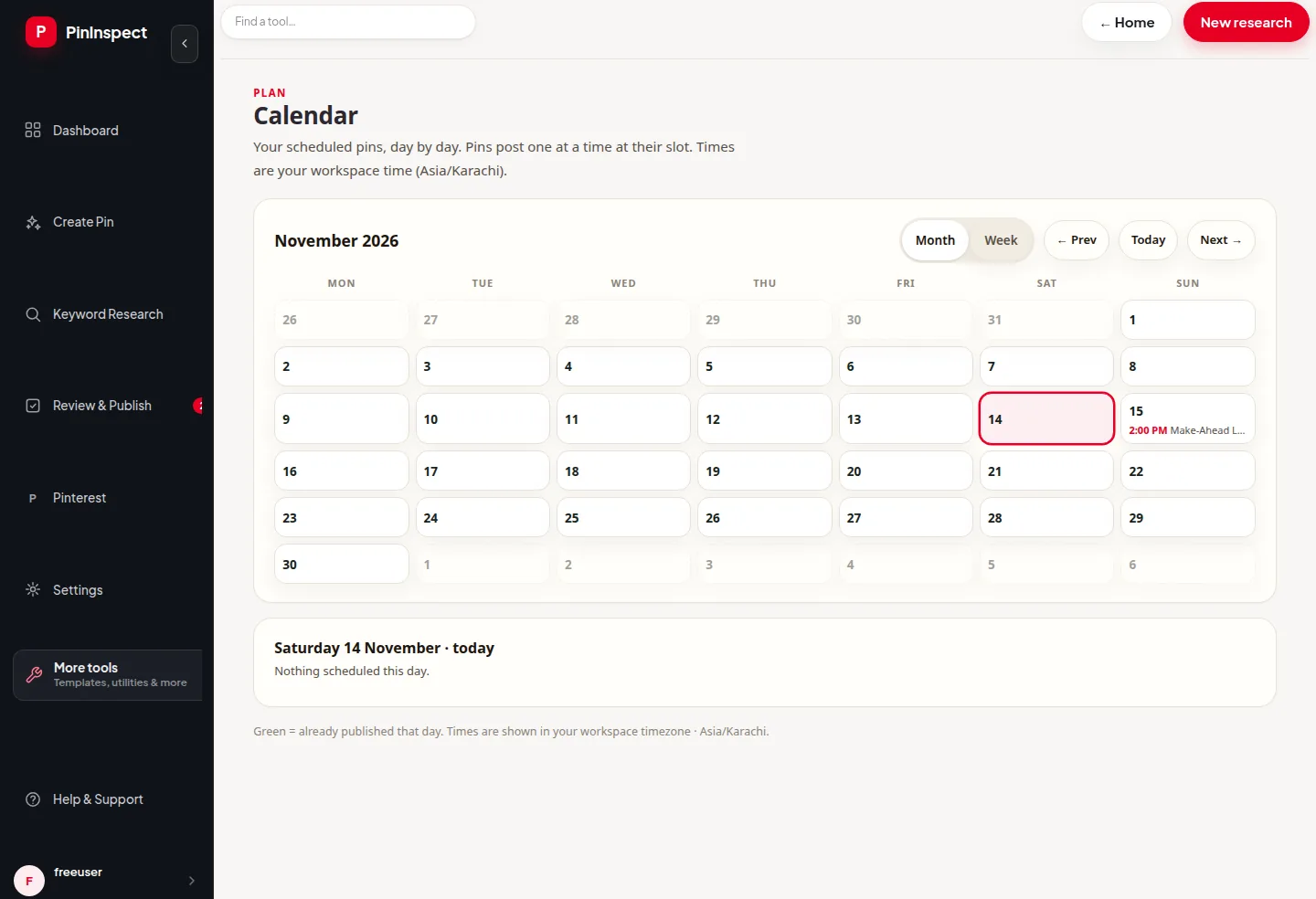
Your scheduled pins on a calendar — and everything waiting to publish.
Connect Pinterest to sync your boards and publish approved pins straight from PinInspect — publishing is live. Research, generation and CSV export all work without it.
Your colours, fonts and logo, applied to Designer pins.
The full design library — pick a look and make it yours, or create your own.
No concept gallery, no extra decisions. Check your finished pin, confirm its Pinterest details, and publish it now or add it to your schedule.
Review the actual image before it goes live.
Catch missing details before the pin goes live.
Keep track of this pin after review.
Update the headline on this pin.